What I Built
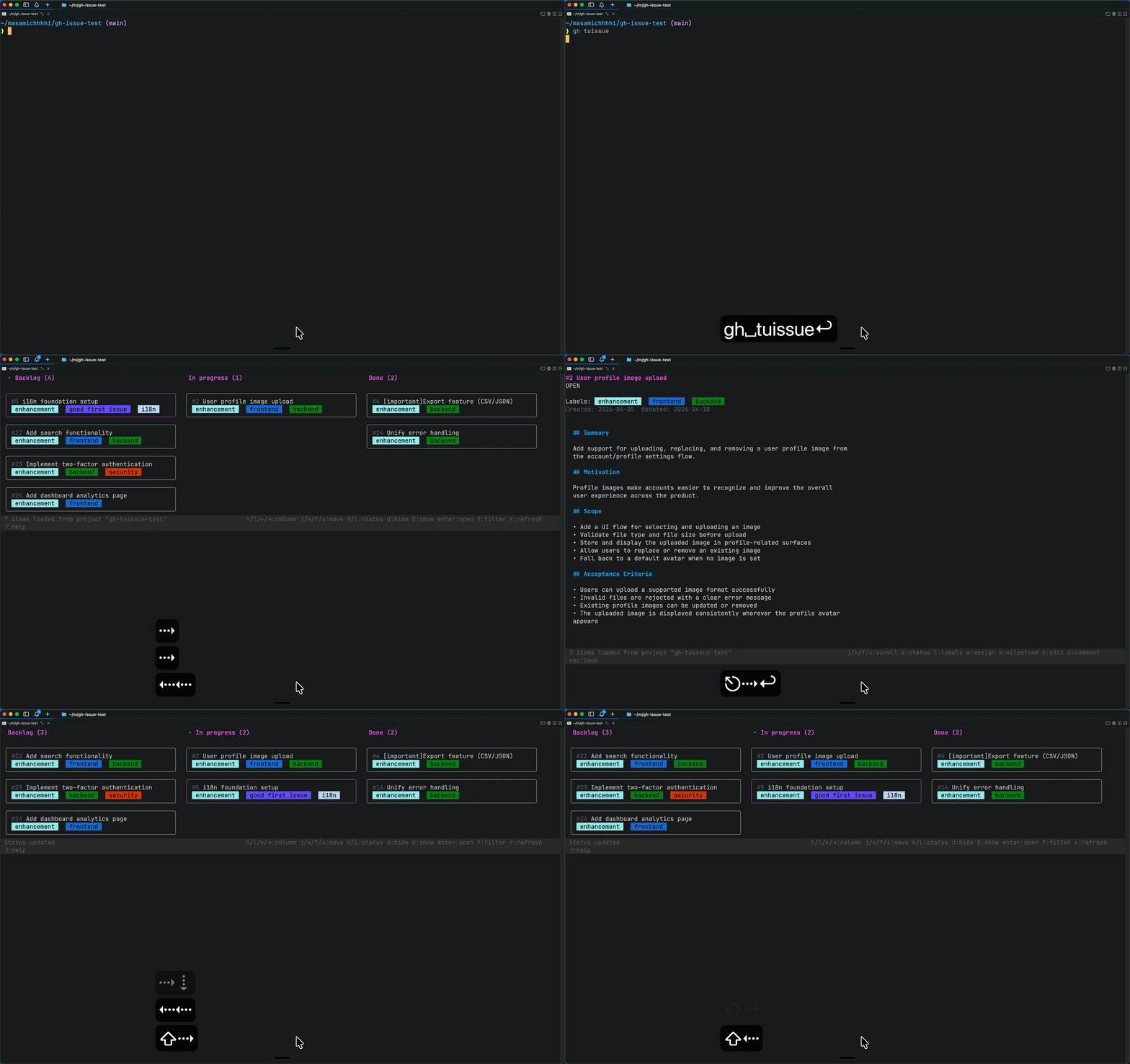
A TUI (Text User Interface) tool that lets you list Issues and change their state in a Kanban-style board.
GitHub - masamichhhhi/gh-tuissue: gh-tuissue is a GitHub CLI extension that provides a TUI (Text User Interface) for browsing and updating repository issues from the terminal.
gh-tuissue is a GitHub CLI extension that provides a TUI (Text User Interface) for browsing and updating repository issues from the terminal. - masamichhhhi/gh-tuissue
Background
I got hooked on the “manage your life with GitHub” task management method proposed by kyohei.
githubで人生を管理する

【GitHubで人生を管理する】 実際のリポジトリ公開 +やり方を解説
前編: https://youtu.be/KHiq6nf0Jio?si=8r9hwxal-VZaVsfD▼ 動画内で紹介したもの- githubで人生を管理する(Zenn): https://zenn.dev/hand_dot/articles/85c9640b7dcc66- Claude Code Skills...

The nice thing is that you can manage everything in the familiar form of GitHub Issues, and coding agents like Claude Code can operate on them easily.
I also use Obsidian, and I manage my Vault (something like a workspace) as a GitHub repository. Once it’s linked to GitHub Issues and Projects, I can ask Claude to turn rough ideas I jotted down in Obsidian into Issues, or to tie them to existing Issues and organize them — which is very comfortable.
But once I started using this workflow for real, the one thing that stressed me out was having to open the browser every single time. Open the browser, go look at the Project, open an Issue, change its state, then switch back to another tab. These small context switches pile up and, surprisingly, chip away at focus.
I wanted a TUI (Text User Interface) tool that would let me list Issues, move their state, and even create new ones — all inside the terminal. So I built gh-tuissue using spec-driven development with Claude Code.
Features and Usage
gh-tuissue is a GitHub CLI extension that lets you handle GitHub Issues as a Kanban-style TUI.
If a GitHub Project is linked, you can work with its columns directly from the terminal.
You can do things like:
- List Issues on the project’s Kanban board
- Move an Issue’s state with
Shift+←/Shift+→ - Open the details of an Issue
- Create a new Issue
- Edit comments and body text
Installation is easy because it’s a GitHub CLI extension.
gh extension install masamichhhhi/gh-tuissueUsage is simple too.
gh tuissue --project 1
gh tuissue --repo owner/name --project 1
For detailed usage, check the README in the repository.
System Overview
The overall design is quite simple.
Instead of writing a new API client, it just uses the already-authenticated gh CLI as-is.
┌──────────────┐       ┌──────────────┐       ┌──────────────┐
│  gh-tuissue  │  exec │   gh CLI     │  API  │  GitHub API  │
│ (TUI, Go)    │──────▶│ (authed)     │──────▶│ Issues/Proj  │
└──────────────┘       └──────────────┘       └──────────────┘
       ▲                                             │
└──────────────── JSON result ────────────────┘- Since it runs as a GitHub CLI extension, installation and authentication can be left to
gh - Fetching and updating Issues / Projects is done by invoking
gh apiandgh issuesubcommands internally - The UI side uses Bubble Tea’s Elm architecture (
Model/Update/View), separating the board, details, filter, and other views - Only the part that calls
$EDITORto edit body text or comments is delegated to an external process
As a result, I didn’t have to manage OAuth or tokens myself, and I could focus on the TUI that lives entirely inside the terminal.
Thoughts on Doing Spec-Driven Development Fully Leveraging Claude Code
This tool was built with spec-driven development (SDD) using Claude Code. I was able to build it pretty fast, but there were also difficulties unique to this approach — so I want to share my impressions.
cc-sdd Was Great
For doing spec-driven development, I used a Claude Code plugin called cc-sdd.
GitHub - gotalab/cc-sdd: Spec-driven development (SDD) for your team's workflow. Kiro style commands that enforce structured requirements→design→tasks workflow and steering, transforming how you build with AI. Support Claude Code, Codex, Opencode, Cursor, Github Copilot, Gemini CLI and Windsurf.
Spec-driven development (SDD) for your team's workflow. Kiro style commands that enforce structured requirements→design→tasks workflow and steering, transforming how you build with AI. Support ...
I used it to bounce vague ideas around, have it decide on the spec, and then have the AI implement based on that spec. As a result, about 90% of what I wanted to achieve was implemented in just a few minutes.
The Difficulty of Spec-Driven Development
First, even reviewing the spec itself is a heavy load. Specs can end up with more ambiguous wording than code, and the writing style rules are less consistent than code, so it’s quite hard even for me to judge what’s missing or what’s wrong. I suspect we need strict rules for how specs are written too, but I didn’t get that far this time.
Also, while 90% of what I wanted worked, it didn’t behave exactly as intended on the first try. When that happens, I ask Claude to fix bugs or make improvements — but managing the spec at that point is really tricky.
If I just say “update the corresponding spec,” I often ended up with a long list of prohibitions like but do not do XXX. Defining clear rules for spec updates would probably reduce this somewhat. Still, whether a spec really needs to be updated every time you fix a small bug that only takes 1 or 2 lines is debatable.
I’m Not Sure Whether to Publish Specs Used for Spec-Driven Development
I kicked off with spec-driven development this time, but I couldn’t maintain the specs all the way through, so I decided not to publish the generated specs as part of the repository.
Even if I had a system in place to maintain the specs, should they be included in what’s published as OSS? 🤔
For OSS projects with many committers, I honestly can’t picture a world where specs stay maintained within the project. The maintainers would probably need a very strong philosophy and have to enforce spec updates.
Similarly, I was torn about whether to publish AI agent rules and skill settings like .claude or .codex, and in the end decided not to — keeping only a minimal CLAUDE.md in the repo.
Closing Thoughts
That was an introduction to gh-tuissue and some thoughts on building a small OSS project with spec-driven development.
So far, I’m very happy with the feeling of being able to manage Issues without leaving the terminal ☺️
Also, now that AI-assisted development has become the norm, publishing my own OSS made me think about a few things. The issue of AI burning out OSS maintainers has been getting attention recently, and after publishing my own project I feel it even more strongly — the number of rules maintainers have to put in place has really grown.
AI is burning out the people who keep open source alive
Open source projects are in crisis. They're being flooded with large volumes of AI-generated pull requests that merge cleanly but don’t actually work.
Anyway, I’d love it if you tried gh-tuissue and gave me feedback, opened issues, or dropped a star!
GitHub - masamichhhhi/gh-tuissue: gh-tuissue is a GitHub CLI extension that provides a TUI (Text User Interface) for browsing and updating repository issues from the terminal.
gh-tuissue is a GitHub CLI extension that provides a TUI (Text User Interface) for browsing and updating repository issues from the terminal. - masamichhhhi/gh-tuissue